
Cached program management tool
Intelligent Standby List Cleaner is a free utility program for PC created by Wagnardsoft. It's a Windows tool that can help users manage the standby list for cached processes and applications. They can monitor and terminate unessential background apps to free up RAM for other apps to utilize.
Top Recommended Alternative

Similar in concept to other tools like Windows Memory Cleaner or Compact RAM Cleaner, Intelligent Standby List Cleaner makes it easy for users to identify background processes that have the largest cached memory reserved for them. It can also be set to monitor these types of activities and act accordingly.
Faster computer experience
Intelligent Standby List Cleaner does not necessarily shut down or close other active applications that are running in the background. You should know that there is still a huge possibility that you will not get any improvement on your computer speed, even after you have all said background apps turned off. Standby memory also contributes a lot in slowing down your PC.
If you are not familiar with it, it is a standby memory that the computer is not using nor being exhausted. It will lie in wait while another app, software, or program is launched and activated. The thing is, there are days when we do not open that many applications, and therefore there is no need for standby memory. Intelligent Standby List Cleaner saves you the time and effort of having to shut down and restart your PC by taking care of the problem itself.
Automation and monitoring
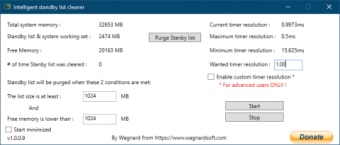
The software is quick to do its job. The moment it senses that the standby memory of your PC reached 1GB, it will automatically get rid of it. The app is also surprisingly easy to use despite the name. However, beginners need studying to understand the interface and settings. But that won't be necessarily long. The software will simply show you the amount of memory being used, on standby, and buttons that you can click whether you would like to start cleaning up the standby memory or not.
Set specific parameters to help it monitor and remove entries on the list by configuring threshold levels and cleaning intervals to achieve optimal performance. You should also whitelist the tool from your anti-virus program to prevent it from getting closed. There is still a chance that things will not go as planned, so it's best to create a system restore point that you can revert to.
A must-try
All in all, if you're running an old PC system and have been experiencing random slowdowns and lag, Intelligent standby list cleaner is a must-try tool to see if it can help speed things up and improve your overall computing experience. There is a bit of a learning curve at the start, but you can get past it in no time.